Skip to content

Why Choose a Fanless PC for Industrial Use?

A Fanless PC can keep an industrial system running where dust, vibration, and long operating hours make moving parts a concern. Picture a control cabinet near a production line: fine particles settle on surfaces, motors shake their mounts, and a small fan may become another point of failure. A fanless design removes that component and can reduce maintenance needs. It is not magic, though.

The right choice depends on the installation. Engineers should check processor load, ambient temperature, enclosure airflow, and mounting position. A fanless unit still produces heat; its chassis must move that heat away. A sun-facing cabinet or a sealed enclosure can push temperatures beyond the device’s rated range. Those details matter more than a tidy product label.

A verified quotation from a named Fanless PC industry expert was not included in the supplied material, so I won’t invent one. For a reliable article, add a sourced statement from an identifiable engineer or manufacturer specialist. The central question remains practical: will the PC stay within its thermal limits under real workloads, not just in a clean test room? That deserves careful checking.
Why Choose a Fanless PC for Industrial Use?

How Fanless PCs Manage Heat Without Moving Parts

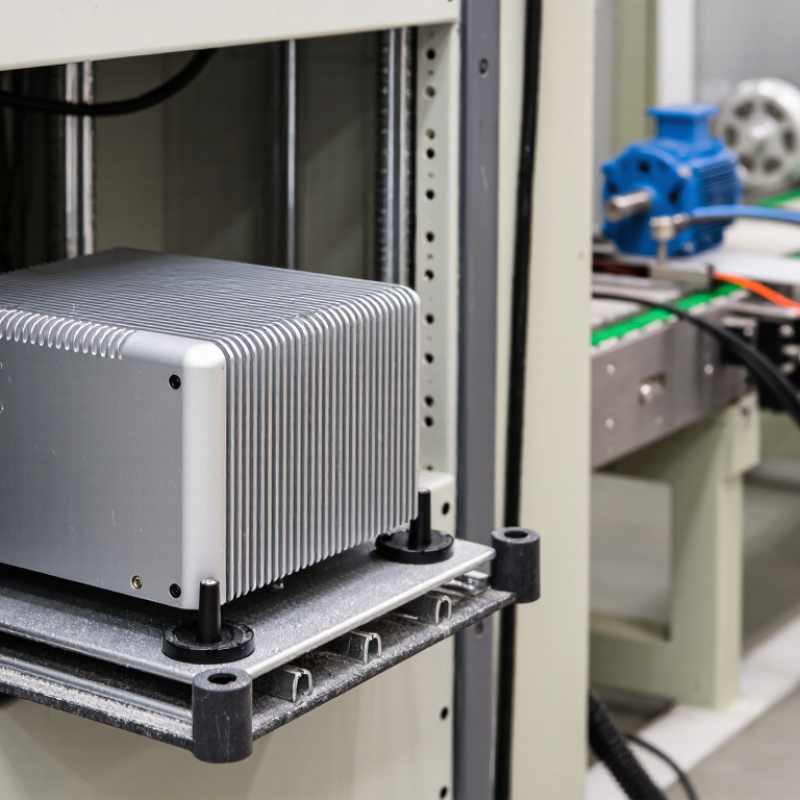
A fanless industrial PC does not eliminate heat; it gives heat another route out. Processors and power components transfer warmth through thermal pads or plates into a metal chassis. The chassis then releases heat across its surface through natural convection and radiation. It is a quiet process. No fan pushes air through the enclosure, so dust and fibers have fewer paths inside.

Inside, component layout matters. A heat spreader must contact the right parts, and thermal material needs even pressure. A loose screw or uneven surface can weaken that contact. In a control cabinet, the PC also needs clearance around its case. If it is pressed against a warm panel, heat may build up instead of escaping. Small details count.

Engineers typically match processor power to the expected workload and ambient temperature. They may test the system while running sustained tasks, then check temperatures and performance over time. Fanless designs can reduce maintenance, but they are not immune to overheating. High cabinet temperatures, direct sunlight, or blocked airflow can still trigger thermal throttling. The trade-off is easy to underestimate: a sealed, silent computer still depends on its surroundings.

Key Advantages of Fanless PCs in Industrial Environments

A fanless PC can suit industrial work where dust, vibration, and limited maintenance access are everyday concerns. Without a cooling fan, there is one less moving part to wear out or pull airborne particles into the enclosure. That can reduce cleaning needs and help keep equipment running in control cabinets, workshops, or production areas. Fewer moving parts. A practical advantage.

Fanless designs rely on heat moving through the chassis, so they still need careful installation. Leave space around the case, check the manufacturer’s operating temperature range, and avoid placing the unit beside hot motors or sealed against a wall. A rugged enclosure may resist dust and vibration, but no design is immune to poor airflow or excessive heat. I have seen “maintenance-free” treated too literally; periodic inspection still matters. Choose a system based on its actual workload, interfaces, and site conditions, not appearance alone.

Tips: Before installation, measure cabinet temperature during a normal shift. Keep vents or heat-dissipating surfaces unobstructed, and review operating logs after deployment. If temperatures rise, improve spacing or cabinet ventilation rather than assuming the PC is faulty.

Industrial Applications Suited to Fanless Computing

Industrial Applications Suited to Fanless Computing

Fanless computers fit environments where moving air can pull dust into delicate electronics. Think of a packaging line, where paper fibers settle near sensors, or a vehicle-mounted controller exposed to vibration. With no internal fan, there is one less mechanical part to fail. Less noise, too. That matters in control rooms and inspection stations.

Manufacturing plants increasingly depend on data gathered near machines. IDC forecast worldwide edge-computing spending would reach $232 billion in 2024, reflecting investment in local processing. A fanless system can analyze camera feeds, read sensors, or keep a production dashboard running close to the equipment. It can also reduce reliance on remote connections. But edge growth does not mean every installation needs a fanless PC.

Deloitte and MAPI’s 2019 Smart Factory study found that 86% of surveyed executives expected smart factory initiatives to drive competitiveness within five years. Fanless computers may support those systems in warehouses, food-processing areas, and outdoor kiosks, provided their thermal limits match the workload.

Check the stated operating-temperature range, enclosure rating, and heat buildup inside the cabinet. Heat is easy to underestimate. I have seen compact devices specified for harsh conditions still struggle when mounted beside warm drives.

Fanless designs trade airflow for passive heat dissipation, so sustained heavy processing needs careful testing. The trade-off is real.

Factors to Consider When Selecting a Fanless PC

Why Choose a Fanless PC for Industrial Use?

Factors to Consider When Selecting a Fanless PC

Selecting a fanless PC starts with the work it must perform. A controller reading sensor data needs less computing power than a vision system analyzing images. Match the processor and memory to the real workload, not just a future wish list. Excess capacity can increase heat and cost. There is no perfect configuration.

Thermal design deserves close attention. Check the rated operating temperature against conditions inside the cabinet, which may be warmer than the room. A passive heatsink needs a clear path to release heat, so mounting position and nearby equipment matter. Review the manufacturer’s derating guidance, too. Dust matters. A sealed enclosure can limit contamination, but it may also retain heat. Test the full setup under sustained load, not only during a brief startup.

Then check the practical details: required ports, network connections, storage type, mounting options, and vibration tolerance. Confirm that cables can be routed without blocking ventilation surfaces. Consider how technicians will reach the unit for inspection or replacement. Fanless systems avoid fan maintenance, but they still need suitable cleaning and temperature checks. A common planning mistake is choosing a compact enclosure before confirming its clearances. I would revisit that decision against the actual cabinet layout.

Operating Limits and Maintenance Requirements of Fanless PCs

Why Choose a Fanless PC for Industrial Use?
Operating Limits and Maintenance Requirements of Fanless PCs

A fanless PC avoids moving parts, but its operating limits still depend on heat, workload, and installation. Check the specified ambient temperature and processor power before mounting it inside a cabinet. A sealed metal enclosure can trap heat, even when the room feels cool. Small detail. Cable glands and nearby drives can also restrict heat escape. Keep clear space around the chassis, and do not cover its heat-dissipating surfaces.

Temperature ratings are not guarantees for every workload. Continuous image processing, vibration, and direct sunlight may raise internal temperatures beyond a light-duty test. Use the computer’s published limits, then check temperatures during a representative production shift. If readings approach the upper range, reduce the load or improve cabinet ventilation. That is sometimes overlooked. A quick bench test can miss the hottest afternoon of the year.

Fanless does not mean maintenance-free. Inspect fins and vents for oil mist, lint, or metal dust; buildup blocks heat transfer. Wipe surfaces with power isolated, following the equipment instructions, and avoid forcing debris deeper into gaps. Check mounting screws, seals, connectors, and cable strain during scheduled shutdowns. Keep a simple log of ambient and case temperatures. It may feel fussy. Those notes can reveal gradual changes before an unexpected shutdown disrupts a production line.

Why Choose a Fanless PC for Industrial Use? - Operating Limits and Maintenance Requirements of Fanless PCs

Area Typical Operating Limit or Requirement Practical Guidance
Ambient temperature Ranges vary by model. Industrial systems commonly specify a range such as 0–50°C; extended-temperature models may support lower or higher limits. Check the individual system specification. Allow for heat from nearby equipment and avoid installing the PC in an unventilated enclosure without thermal assessment.
Humidity Many systems specify non-condensing relative humidity, often within a range such as 10–90%. Prevent condensation during rapid temperature changes. Use appropriate environmental protection where moisture or washdown is present.
Thermal load and airflow The processor and other components dissipate heat through the chassis or heatsink; sustained high workloads can raise internal temperatures. Keep heatsink surfaces unobstructed and follow specified clearances. Monitor temperatures under the actual workload, especially in hot environments.
Dust and contamination Fanless designs avoid fan-driven intake, but dust can still collect on external cooling surfaces and connectors. Enclosure protection varies by model. Inspect and clean cooling surfaces as needed. Do not assume a fanless PC is sealed or suitable for corrosive, oily, or washdown environments without a suitable ingress rating.
Vibration and shock Allowable levels depend on the system, storage device, mounting method, and test conditions. Review the specified vibration and shock test data for the intended installation. Secure cables and use the approved mounting method.
Mounting and clearance Permitted orientations and required clearances are model-specific; some chassis use their mounting surface as part of the heat-dissipation path. Follow the installation guide. Keep cooling surfaces clear and avoid mounting against materials that prevent heat transfer unless specified.
Routine inspection No cooling fan means there is no fan bearing or fan filter to replace, but other components and connections still require attention. At scheduled maintenance intervals, check for dust buildup, loose cables, corrosion, unusual heat, and signs of enclosure damage.
Cleaning Cleaning methods must be compatible with the enclosure, connectors, and site safety procedures. Power down when required by the maintenance procedure. Use a soft brush or approved low-pressure method; avoid liquids and high-pressure air unless the manufacturer permits them.
Internal service Thermal pads, heatsinks, storage, and other internal parts are service-dependent; opening the chassis may affect protection or warranty terms. Do not replace thermal materials or open a sealed enclosure as routine cleaning. Follow the service manual and use qualified personnel where required.
Specification check Temperature, humidity, ingress protection, power input, and environmental test limits differ between models. Confirm all limits in the exact model’s datasheet and installation documentation before deployment; the ranges above are general guidance, not universal ratings.