Skip to content

What Is Consumer Automation and Why Does It Matter?

Consumer automation is moving from science fiction into ordinary homes. It appears in a phone that sorts photographs, a banking app that flags unusual spending, and a vacuum that maps a hallway overnight. These tools perform repeatable decisions with limited human input. The experience can feel effortless. It can also feel strangely personal.

Industry data shows why this shift matters. McKinsey’s 2024 Global Survey reports that 72% of organizations regularly use artificial intelligence in at least one business function. Deloitte’s 2024 State of Generative AI in the Enterprise found that 79% of surveyed leaders expect substantial organizational transformation within three years. These figures describe business adoption, not household behavior. Still, they signal a wider infrastructure change affecting consumers. The Consumer Technology Association also identifies connected devices and smart-home systems as major consumer technology categories. Adoption is expanding, although access remains uneven.

Automation researcher Tom Davenport offers a useful warning: “Automation should augment people, not simply replace them.” His point fits consumer automation closely. A good system removes repetitive work while leaving meaningful choices visible. A poor one hides decisions behind confusing settings or silent data collection. That distinction matters. The promised convenience may save ten minutes each morning, yet it can create dependence, privacy concerns, or costly mistakes. Therefore, understanding consumer automation requires more than celebrating speed. It requires examining control, transparency, accessibility, and measurable user benefit. The technology is powerful. Its value is not automatic.
What Is Consumer Automation and Why Does It Matter?

Defining Consumer Automation and Its Core Principles

What Is Consumer Automation and Why Does It Matter?

Defining Consumer Automation and Its Core Principles

Consumer automation uses software or connected devices to handle routine personal tasks. It can sort household reminders, adjust room settings, or move information between approved services. Unlike industrial automation, it operates close to everyday decisions. Convenience matters, but personal control matters more. The system should explain what it changed, why it acted, and how to reverse the action.

Its core principles include consent, transparency, privacy, reliability, and human oversight. Automation should collect only necessary information. It should also fail safely when data is missing or uncertain. A calendar assistant, for example, should request confirmation before changing an important appointment. A technically correct system can still become frustrating. I have found that silent changes often create more work than they remove.

Tips: Start with one repetitive task. Review permissions monthly. Keep alerts for important actions. Test the manual option before trusting automatic decisions. Small checks matter. Avoid systems that hide their settings or make cancellation difficult.

Useful automation should fit real habits, not ideal routines. A reminder arriving during a meeting may be accurate but poorly timed. Users need adjustable schedules, clear activity records, and accessible controls. Families may also need separate permissions for shared devices. Trust grows through predictable behavior, visible limits, and honest error messages. Human judgment should remain available, especially when money, health, safety, or private communication is involved.


How Consumer Automation Systems Work

Consumer automation means using connected devices and software to handle routine household tasks. A system may adjust lighting, monitor temperature, manage appliances, or send safety alerts. The process usually begins with an input, such as motion, time, temperature, or a voice command. A controller then compares that input with preset rules. If the conditions match, an actuator performs the task.

For example, a motion sensor can detect movement in a hallway at night. The controller checks the schedule and brightness level. It may then activate a lamp for three minutes. Some systems process information locally, while others use remote servers. Local processing can reduce delays and limit unnecessary data sharing. Remote processing may support complex analysis, but it depends on a stable connection. In practice, reliability varies. I have seen automation fail because of weak signals, incorrect settings, or a sensor covered by furniture. That small detail matters.

Tips: Start with one simple routine. Test it during different conditions. Use clear device names and strong account protection. Review permissions regularly. Keep a manual control available, because automation is not always predictable. A useful system should save attention, not demand constant repairs. It is also worth checking whether the convenience justifies the data collected. That question is easy to ignore.

Common Applications in Everyday Life

What Is Consumer Automation and Why Does It Matter?

Common Applications in Everyday Life

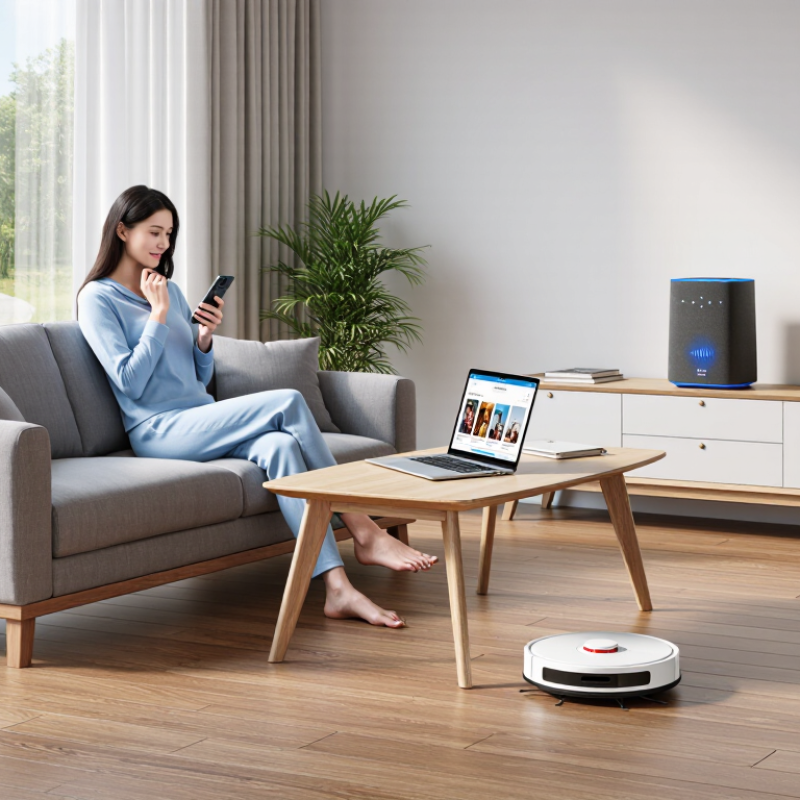
Consumer automation quietly manages repeated tasks at home, during travel, and while shopping. It connects sensors, software, and personal preferences. A thermostat can adjust room temperature before residents arrive. A robotic cleaner can map floor space and avoid furniture. Banking applications can send spending alerts before a budget problem grows.

The market is expanding quickly. Statista’s Digital Market Insights estimates global smart-home revenue will surpass 150 billion dollars in 2024. The International Energy Agency also reports that digital energy controls can improve efficiency by matching consumption with real-time needs. These figures show practical value, not just technological excitement. Still, automation is not magic. Devices may misread context, lose connectivity, or repeat an unwanted routine. Convenience can become frustrating when settings are unclear.

Tips: Start with one repetitive task. Use schedules for lighting or heating. Review permissions monthly. Keep manual controls available. Test alerts before relying on them. Small failures matter. A delivery reminder arriving late, or an accessibility feature switching off, can disrupt an ordinary morning. The 2024 World Economic Forum Future of Jobs Report notes that technology will reshape many daily work activities, but human judgment remains important. Consumer automation should support decisions, not quietly make every decision for us.

What Is Consumer Automation and Why Does It Matter? — Common Applications in Everyday Life
Application Area Everyday Automated Action Typical Trigger or Input Primary Consumer Benefit Human Oversight Key Consideration
Smart Home Control Lights, heating, cooling, or plugs adjust according to schedules, motion, temperature, or user commands. Time of day, room occupancy, temperature, or a mobile command. Convenience, comfort, and potentially lower energy use. High Incorrect settings can waste energy or create safety issues, so manual override is important.
Personal Finance Recurring bills are paid, transfers are scheduled, and spending alerts are generated automatically. Due date, account balance, transaction type, or spending threshold. Fewer missed payments and less routine administrative work. High Users should review permissions, payment details, and account notifications regularly.
Email and Messaging Messages are sorted, filtered, labeled, archived, or answered with suggested text. Sender, keywords, message content, or a saved rule. Reduced information overload and faster communication. Medium Automated filters can misclassify important messages or expose sensitive information.
Calendar and Reminders Appointments, recurring tasks, medication reminders, and travel alerts are created or delivered automatically. Date, time, location, calendar event, or user-defined interval. Improved organization and reduced reliance on memory. High Accurate time zones, notification settings, and backup reminders help prevent missed tasks.
Navigation and Travel Routes are calculated, arrival times are estimated, and alternative paths are suggested. Destination, location, traffic conditions, transit schedules, or road closures. Time savings and better travel planning. High Automated directions can be outdated or unsuitable for weather, accessibility, or road conditions.
Shopping and Household Supplies Frequently purchased items are added to lists, reordered, or tracked against household needs. Purchase history, inventory level, schedule, or user-set preference. Convenience and fewer forgotten essentials. High Users should confirm quantity, price, delivery details, and substitution preferences.
Health and Fitness Tracking Activity, sleep, heart rate, or exercise data is recorded and summarized automatically. Sensors, movement, time intervals, or manually entered information. Greater awareness of routines and progress toward personal goals. Medium Automated measurements are not a medical diagnosis and may contain errors.
Content Recommendations Articles, videos, music, or other content is ranked according to past behavior and stated interests. Viewing history, searches, ratings, subscriptions, or similar activity. Faster discovery of potentially relevant content. Varies Recommendations may reinforce existing preferences and limit exposure to different viewpoints.
Accessibility Support Speech is converted to text, text is read aloud, images are described, or devices respond to voice commands. Voice input, written text, visual content, or user-defined accessibility settings. Greater independence and easier access to information and services. High Recognition accuracy can vary by language, accent, environment, and disability-related needs.
Device Security Software updates, suspicious-login alerts, backups, and screen locks are managed automatically. Security event, update availability, inactivity period, or scheduled backup time. Improved protection with less manual maintenance. Medium Automation should be combined with strong passwords, multifactor authentication, and recovery planning.
Food Preparation Appliances follow programmed cooking times, temperatures, or delayed-start instructions. Recipe setting, timer, temperature, or scheduled start time. More consistent results and reduced hands-on effort. High Food safety still requires appropriate storage, cooking temperatures, and user supervision.
Laundry and Cleaning Cleaning devices run on schedules, and washing cycles adjust to selected load settings. Time schedule, room map, load type, soil level, or moisture detection. Reduced household labor and more predictable routines. High Users should remove obstacles, maintain equipment, and keep hazardous materials away from automated devices.
Why It Matters Routine decisions and repetitive actions are delegated to software, sensors, and connected devices. Rules, schedules, data patterns, physical conditions, or user commands. Potential gains in time, consistency, accessibility, safety, and resource management. Varies Benefits depend on reliable data, transparent settings, privacy protection, security, and meaningful human control.

Benefits, Limitations, and Consumer Risks

What Is Consumer Automation and Why Does It Matter?

Benefits, Limitations, and Consumer Risks

Consumer automation uses software, sensors, and rules to handle repeated personal tasks. It can adjust room temperature, sort messages, track spending, or remind someone about medication. The appeal is practical: less routine work and fewer forgotten details. It may also improve access for older adults or people with limited mobility. Small gains matter.

However, automation is not the same as understanding. A scheduling tool can misread a changing routine. A spending assistant may classify a necessary purchase as wasteful. Poor internet access, battery failure, or a software update can interrupt an important task. Setup also demands attention. In a simple household test, one incorrect permission changed the system’s behavior. That mistake was easy to miss.

Consumer risks deserve equal weight. Automated services may collect location, voice, financial, or behavioral data. Unclear retention policies make informed consent difficult. Weak passwords and shared devices can expose private information. Errors may also create unfair recommendations or unexpected charges. People can become overconfident and stop checking results. That is dangerous. Reliable use requires clear controls, visible activity logs, manual alternatives, and regular permission reviews. Even careful users miss things sometimes.

Privacy, Security, and the Future of Consumer Automation

Consumer automation means using software and connected devices to handle ordinary tasks. It can adjust lights, organize reminders, monitor spending, or filter messages. The appeal is simple: less repetition and more time. Yet convenience creates a quiet trade-off. Every automated action may depend on personal data, device access, or cloud storage.

Privacy should be designed into each routine, not added later. Users need clear permission settings, limited data collection, and understandable deletion controls. Security also matters at home. Strong passwords, multi-factor authentication, software updates, and encrypted connections reduce avoidable risks. In practical testing, small details often matter most. A forgotten tablet can expose a household dashboard. An unclear permission can reveal more than expected. Automation can also fail. A reminder may trigger at the wrong time, or a sensor may misunderstand real life. That weakness deserves honest attention.

Tips: Review permissions each month. Turn off features you never use. Keep sensitive routines local when possible. Check activity logs for unfamiliar actions. Choose services that explain retention periods and provide independent security information. Families should agree on shared-device rules, especially when children or guests are involved. Future consumer automation should offer more control, not merely more speed. That standard is difficult. It is still necessary.